
How I Built an AI-Powered Job Search Engine in an Afternoon — And Why Every Job Seeker Should Do the Same#
If you’ve been job hunting recently, you know the drill. You wake up, open your inbox, and there they are — a wall of emails from LinkedIn, Indeed, Jobright, and Built In, each one containing anywhere from one to fifteen job listings that may or may not be relevant to you. You open each one. You skim. You copy and paste the interesting ones somewhere. You forget which ones you already looked at. You apply to a few. You lose track of where you applied. Repeat tomorrow.
I was spending one to two hours a day on this process. As a Senior Technical Program Manager who has spent a decade building platforms, automating workflows, and eliminating operational inefficiencies at scale — I finally got tired of the irony.
So I built a solution. And it works.
The Problem, Stated Plainly#
Every morning I received job alert emails from four sources:
- LinkedIn — bundles 10–15 job listings per email
- Jobright — bundles 8–12 listings, includes AI match percentages and salary ranges
- Built In — bundles multiple listings by category
- Indeed — sends one job per email, personalized to your profile
The manual workflow: open email → read listing → decide if interesting → open job URL → read full description → copy/paste into Claude → ask Claude to evaluate it against my resume → repeat for every listing → try to remember which ones I’d already seen yesterday.
High-friction. Inconsistent. No tracking. No memory between sessions.
Exactly the kind of problem I’d been hired to fix at enterprise scale for the past decade.
The Architecture#
The solution is a Node.js script that runs automatically every morning. Here’s what it does:
1. Gmail Integration via OAuth
The scanner connects to Gmail using a read-only OAuth token and reads a dedicated Job Alerts label. Every job alert email from every source routes to this label automatically via a Gmail filter, bypassing my inbox entirely.
2. Deduplication
On every run, the scanner checks a local scanned_ids.json file containing every Gmail message ID it has already processed. New emails are processed; already-seen emails are skipped. After the first run, each daily scan typically processes 5–10 new emails instead of 30–50.
3. AI-Powered Job Extraction
Each email is sent to Claude with a format-aware prompt. LinkedIn emails look completely different from Indeed emails — the prompt accounts for each source’s structure and reliably extracts title, company, location, salary, and URL for every listing.
4. Resume-Based Scoring
Every extracted job is scored 0–100 against my resume using four weighted criteria:
- Title and seniority alignment (35%)
- Skills overlap (30%)
- Remote/location fit (20%)
- Salary floor (15%)
Each job gets a score, a written rationale, a list of matching strengths, and any identified gaps.
5. CRM Dashboard
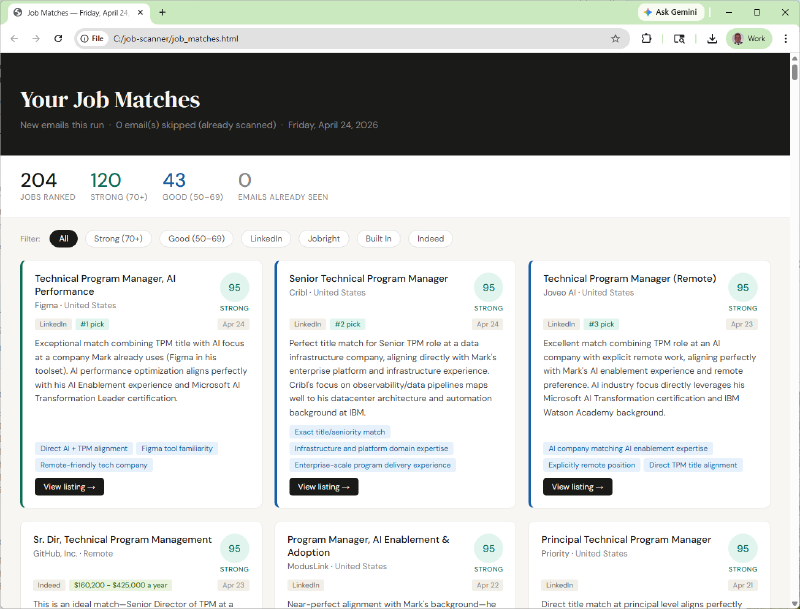
The ranked results are compiled into a single HTML dashboard and published to my personal website automatically. The dashboard includes:
- A ranked job grid with score badges, salary tags, and source filters
- Three tabs: All Jobs, My Pipeline, Weekly Report
- Owner authentication — anyone can view, only I can update application statuses
- Full application pipeline tracking status: Applied → Phone Screen → Interview → Offer → Rejected
- Status changes sync to the server and are visible from any device
The Tech Stack#
No cloud infrastructure. No monthly fees beyond existing hosting.
| Component | Technology |
|---|---|
| Runtime | Node.js (zero npm dependencies) |
| Intelligence | Claude API (Anthropic) |
| Email source | Gmail API via OAuth 2.0 |
| Scheduling | Windows Task Scheduler |
| Upload | FTP via Node.js TCP socket |
The zero-npm-dependencies decision was deliberate. Every library you add is a potential failure point, a security surface, and a maintenance burden. The entire application — Gmail auth, HTTPS requests, base64 decoding, HTML generation, FTP upload — is written against Node’s built-in modules only.
The Configuration#
All user settings live in config.json. No editing the source code:
{
  "ownerPassword": "your-secret",
  "gmailLabel": "Job Alerts",
  "salaryFloor": 150000,
  "preferredLocations": ["Remote"],
  "acceptableHybridStates": ["NC", "SC"],
  "resume": "Your full resume text here..."
}
What I Learned Building This#
Prompt engineering is real engineering. The extraction step failed several times before the prompts were right. LinkedIn emails bundle fifteen jobs in plain text with tracking URLs. Indeed sends one job per email with the title in the subject line. Jobright includes match percentages and salary ranges inline. Each source required a different parsing strategy, and the prompt had to explain all of them clearly enough for Claude to handle without hallucinating data.
Deduplication is the most important problem. Without it, every run processes every email again, wasting tokens and time. With it, daily runs cost pennies and complete in under a minute. The architecture decision to track message IDs locally is what makes this practical as a daily automation.
Separating the data layer from the presentation layer matters. Storing application statuses on the server (not in the HTML) means the dashboard can be regenerated daily without wiping tracking data. This seems obvious in retrospect but required deliberate thinking upfront.
Build a test mode early. node scan.js --test runs with five sample jobs, zero API calls, and zero cost. I built it after burning API credits debugging UI issues. Build it on day one next time.
The Results#
- Daily job search time: ~90 minutes → under 5 minutes
- Jobs evaluated in first week: 94
- First run’s #1 ranked match: applied within 24 hours
- Cost per daily run: ~$0.05–0.15 in API credits
The Bigger Picture#
The architecture here — ingest unstructured data, extract structure with an LLM, score against a configurable rubric, present ranked output, track actions — solves a class of problems that appears constantly in enterprise contexts:
- Match candidates to open roles based on structured profile scoring
- Surface personalized learning recommendations from a skills gap analysis
- Route support tickets to the right team based on content classification
- Score RFP responses against weighted evaluation criteria
Building it for a personal use case produced a reusable template.
Try It Yourself#
The full project — scanner, Gmail OAuth setup, FTP configuration, Task Scheduler automation, and CRM dashboard — is open source at:
github.com/markjgrover/ai-job-scanner
If you’re a job seeker with basic technical comfort, you can have a working version running in an afternoon. Zero npm packages. One config file. Runs on hardware you already own.
I’m a Senior Technical Program Manager open to remote roles in AI/ML platforms, EdTech, DevRel, and enterprise SaaS. Connect on LinkedIn.