
How I Built My Portfolio Without Letting AI Write My Code#
There’s a version of this project where I open Claude or ChatGPT, paste in “build me a portfolio website,” and ship whatever comes back. I’ve seen it done. The output looks fine. Sometimes it even looks good.
That’s not what I did — and the difference matters to me.
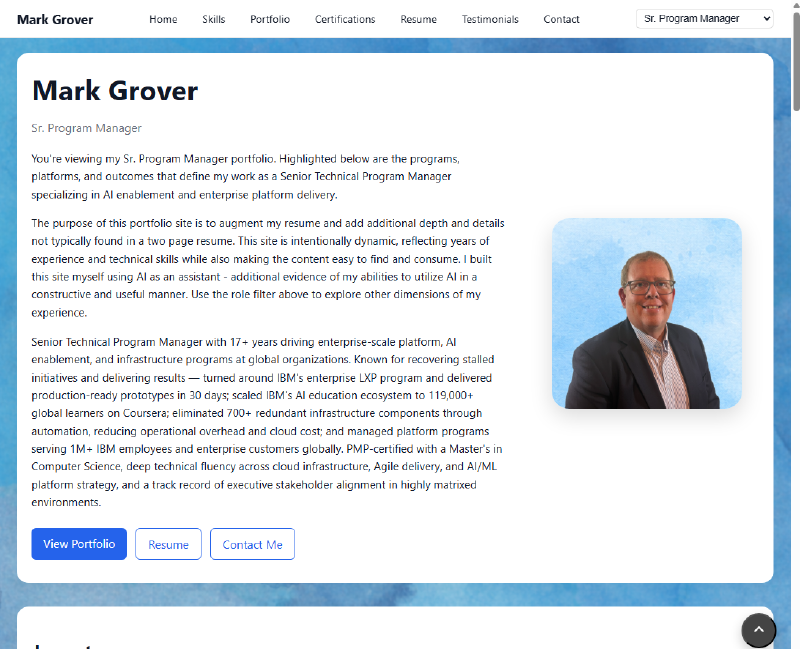
Check out my live site: (https://www.markjgrover.com/)
The Premise#
I’m a Sr. Program Manager, UX Program Manager, and former Site Reliability Engineer. My career spans multiple disciplines, and that’s always been a challenge to communicate in a single portfolio. Different roles value different things. A hiring manager looking for an SRE doesn’t want to wade through UX case studies to find what’s relevant to them.
So the core product requirement was simple: one site, multiple audiences, no confusion.
The technical requirement I set for myself was equally deliberate: build it myself, in vanilla HTML, CSS, and JavaScript, using LLMs as a thought partner — not a code generator.
What “Using LLMs as a Thought Partner” Actually Means#
This is the part I want to be precise, because the distinction is real and it affected the outcome.
When I say I used LLMs as a thought partner, I mean I used them the way I’d use a knowledgeable colleague sitting next to me. I’d describe what I was trying to accomplish, talk through the tradeoffs, ask “what am I missing here?”, and use their input to sharpen my own thinking.
What I didn’t do was paste in a requirement and ask for implementation. I wrote every function. I made every structural decision. I debugged in the browser, not by having Claude fix the error message.
The difference isn’t about moral credit — it’s about what you end up with. When you write the code yourself, you understand it. When something breaks at 11pm before a job application deadline, you can fix it. When you want to add a feature six months later, you know exactly where to look.
I also found that writing the code myself forced me to make real decisions. “Render the role dropdown” sounds obvious until you have to actually implement it — and then you’re deciding whether dropdown state should live in the URL, in memory, or in localStorage, and each of those choices has downstream consequences. An AI assistant would have picked one and moved on. I had to think it through.
The Architecture#
The site is a single HTML file. No React, no Vue, no build step, no node_modules. It loads one CSS file and one JavaScript file, both served statically.
All of the content — every project, every certification, every testimonial, every line of role-specific copy — lives in a single portfolio.json file. The JavaScript fetches it on load and renders everything dynamically from that data.
This was a deliberate choice. I wanted the separation between content and presentation to be total. If I want to add a new portfolio project, I touch the JSON. I don’t go find a component and copy it. If I want to change the headline for a role view, I edit one field in the JSON. The structure enforces good habits.
The Role-Switching Feature#
The part of this project I’m most proud of is the role-based personalization system.
The site reads a ?role= parameter from the URL. When someone lands on markjgrover.com?role=ux, the entire page reframes itself for a UX audience: the hero section shows copy written for that role, the portfolio cards sort and emphasize UX-relevant projects, certifications relevant to UX float to the top, and the testimonials are reordered to lead with the most relevant ones.
This means I can send a job application for a UX Program Manager role and include a URL that presents exactly the right story — without maintaining four separate websites.
The implementation is a single function, applyRole(), that serves as the central orchestrator. When the role changes (via URL param on load, or via the dropdown in the nav), every rendering function is called with the new role as an argument, and each one sorts and filters accordingly. No page reload, no routing library, no state management framework.
I built it this way because I’d thought carefully about what the data model needed to look like. Each portfolio project has a roles array. Each certification has a roles array. The rendering functions read those arrays and sort by relevance. The logic is simple because the data structure is right.
What I Learned#
Data modeling is the hardest part. I spent more time thinking about the shape of portfolio.json than I spent writing any individual feature. Getting that structure right — deciding what belonged at the top level versus nested in details, figuring out how to represent role relevance without duplicating content — paid dividends throughout the rest of the project.
Vanilla JS is underrated. I had a moment about halfway through where I wondered if I should just use React. I’m glad I didn’t. The DOM APIs are genuinely good. IntersectionObserver for scroll spy, URLSearchParams for role detection, querySelector and createElement for rendering — none of it required anything beyond what the browser provides. The site loads instantly because there’s nothing to load.
The absence of a build step is a feature. I can open the folder, edit a file, refresh the browser, and see the change. There’s no compile step, no hot reload configuration to fight, no webpack magic to debug. For a project this size, that simplicity is worth a lot.
LLMs are most useful when you already know what you want. The times I got the most value from AI assistance were when I had a specific, concrete question: “What’s the cleanest way to lock body scroll when a modal is open and restore the exact scroll position on close?” That’s a question with a right answer that I could evaluate. The times it would have been least useful were the big architectural decisions — those required judgment about my own needs and constraints that no LLM could substitute for.
The Stack#
- HTML — semantic, single-page structure
- CSS — custom properties, flexbox and grid, no utility framework
- JavaScript — vanilla ES2020+, no transpilation
- Data — single JSON file, fetched at runtime
- Analytics — Google Analytics (gtag) for role view and resume download tracking
- Icons — Font Awesome 6 via CDN
- Hosting — static file host (no server-side rendering needed)
The Source Code#
The full source is on GitHub at github.com/markjgrover/markjgrover.com. The data/portfolio.json file is particularly worth a look if you’re thinking about how to structure content for a multi-role portfolio — the schema took the most iteration to get right, and I think it ended up in a good place.
If you’re building your own portfolio and want to adapt this approach, the key insight is this: separate your content from your presentation completely, and make role relevance a property of the data, not the UI. Everything else follows from that.
What’s Next#
A few things I’d like to add:
- A print stylesheet for the resume section
- Proper
og:meta tags for social sharing with role-specific descriptions - A “copy role URL” button in the nav so it’s easier to share the right link
But honestly, the site is doing its job. It’s gotten me into conversations I wouldn’t have had with a static PDF. That’s the measure that matters.
Mark Grover is a Sr. Program Manager, UX Program Manager, and former Site Reliability Engineer. He’s on LinkedIn and reachable at mark@markjgrover.com.